Parameters Panel
The left-hand panel is where you set up an instrument before sampling. This page lists every
control top to bottom, with its range, default, and the exact tooltip shown on hover. For the
why behind each setting, follow the links into the Guides.
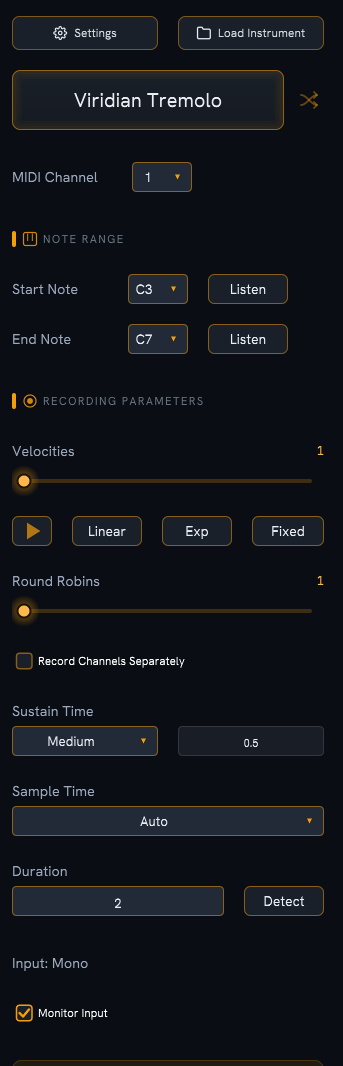
Top bar
| Control |
Type |
Notes (tooltip) |
| Settings |
Button |
"Audio device and application settings" — opens the Settings dialog. |
| Load Instrument |
Button |
"Load a previously saved instrument file" — opens a saved session. |
Instrument name
| Control |
Type |
Notes (tooltip) |
| Instrument name |
Editable label |
"Click to edit instrument name" — click the name to rename. Used for output files and the recorded folder. |
| Shuffle |
Button |
"Generate random instrument name" — fills in a random name. |
MIDI Channel
| Control |
Type |
Range / Options |
Default |
Notes (tooltip) |
| MIDI Channel |
Dropdown |
1–16 |
1 |
"MIDI channel for note playback" — the channel notes are sent on while sampling. |
Note Range
Sets the lowest and highest note to sample; every semitone in between is recorded. See
Note Range & Note Names for the octave convention (this app numbers octaves so
MIDI 60 = C5, which can differ from your DAW).
| Control |
Type |
Range / Options |
Default |
Notes (tooltip) |
| Start Note |
Dropdown |
Any note C0–G10 |
C3 (MIDI 36) |
"First MIDI note to sample" |
| Start Listen |
Button |
— |
— |
"Play the start note to preview" |
| End Note |
Dropdown |
At or above Start Note |
C7 (MIDI 84) |
"Last MIDI note to sample" |
| End Listen |
Button |
— |
— |
"Play the end note to preview" |
Velocities
How many dynamic layers to record per note. See Velocity Layers for how
ranges are split.
| Control |
Type |
Range / Options |
Default |
Notes (tooltip) |
| Velocities |
Slider |
1–9 |
1 |
"Number of velocity layers to record" |
| Expand triangle |
Toggle |
— |
Collapsed |
"Show/hide velocity layer settings" |
| Linear |
Button |
— |
— |
"Distribute velocities evenly" |
| Exp |
Button |
— |
— |
"Distribute velocities exponentially" (weighted toward quieter layers) |
| Fixed |
Button |
— |
— |
"Fill layers from a preset spread of fixed velocity values" |
| Layer 1…N |
Slider / field |
1–127 each |
— |
Target MIDI velocity for each layer (must stay in ascending order) |
Round Robins
| Control |
Type |
Range / Options |
Default |
Notes (tooltip) |
| Round Robins |
Slider |
1–5 |
1 |
"Number of round robin variations per note" |
See Round Robins.
Record Channels Separately
| Control |
Type |
Default |
Notes (tooltip) |
| Record Channels Separately |
Checkbox |
Off |
"Record left and right channels in separate passes" |
See Recording in Stereo.
Sustain Time
How long each MIDI note is held during a recording.
| Control |
Type |
Range / Options |
Default |
Notes (tooltip) |
| Sustain Time |
Dropdown |
Short / Medium / Long / Manual |
Medium |
"How long each MIDI note is held" |
| Manual sustain |
Field |
0.01–10 s |
0.5 s |
Editable only when Manual is selected |
| Option |
Hold time |
| Short |
0.1 s |
| Medium |
0.5 s |
| Long |
2.0 s |
| Manual |
Your entered value |
Sample Time
How long each recording lasts. See Sample Duration & Sustain.
| Control |
Type |
Range / Options |
Default |
Notes (tooltip) |
| Sample Time |
Dropdown |
Auto / Manual |
Auto |
"How sample duration is determined" |
| Duration |
Field |
0.1–30 s |
2.0 s |
"Sample duration in seconds" — read-only in Auto mode |
| Detect |
Button |
— |
— |
"Automatically detect sample duration" — Auto mode only |
In Auto mode the Duration field shows "Please start detection" until you run Detect;
the button reads "Detecting…" while it works.
| Control |
Type |
Notes |
| Input: label |
Status label |
Shows the active input: Mono, Stereo, N channels, Not configured, or No device. Click it to open the audio settings. |
| Monitor Input |
Checkbox |
"Pass audio input through to output for monitoring before recording" — see Monitoring Input. |
Summary box
A live estimate of the run. It updates as you change parameters.
| Row |
What it shows |
| TOTAL SAMPLES |
notes × velocities × round robins |
| ESTIMATED TIME |
total samples × (sustain time + duration + 0.5 s gap between samples) |
| ESTIMATED SIZE |
a 24-bit WAV estimate: samples × sample rate × duration × channels × 3 bytes, plus a small header per file |
Check the estimate before a big run
Velocity layers and round robins multiply the sample count fast. Glance at ESTIMATED TIME
and ESTIMATED SIZE before committing to a wide range.
Actions
| Control |
Type |
Notes (tooltip) |
| Start Sampling |
Button |
"Begin recording all pending samples" |
| Export |
Button |
"Export instrument to SFZ, KSP, or Decent Sampler" — disabled until the instrument has samples. See Export Formats. |